
Objective
User and Transaction Audit logs are available to Company Admins in Advisor360 Express to report on activity across the platform. Here are some ways that Audit Logs can help you:
-
Compliance - User Administration & System Security
-
Detailed activity tracking for in-flight transactions
-
Troubleshooting issues
Introduction
Express Audit Logs are categorized into two types:
-
User Audit Logs track user administration and security actions The User Audit Log adds value for Company Administrators and System Administrators to monitor for potentially high-risk activities. This compliance audit log is automatically available when you need it.
-
Transaction Audit Logs track transaction related activities to provide more detail than the summary timeline and information in the Details Card summary. This information is useful for tracking progress and troubleshooting.
To access the User Audit Log, open the Workspace Administration and click on the Audit Log icon:
Audit Log Events
User Audit Logs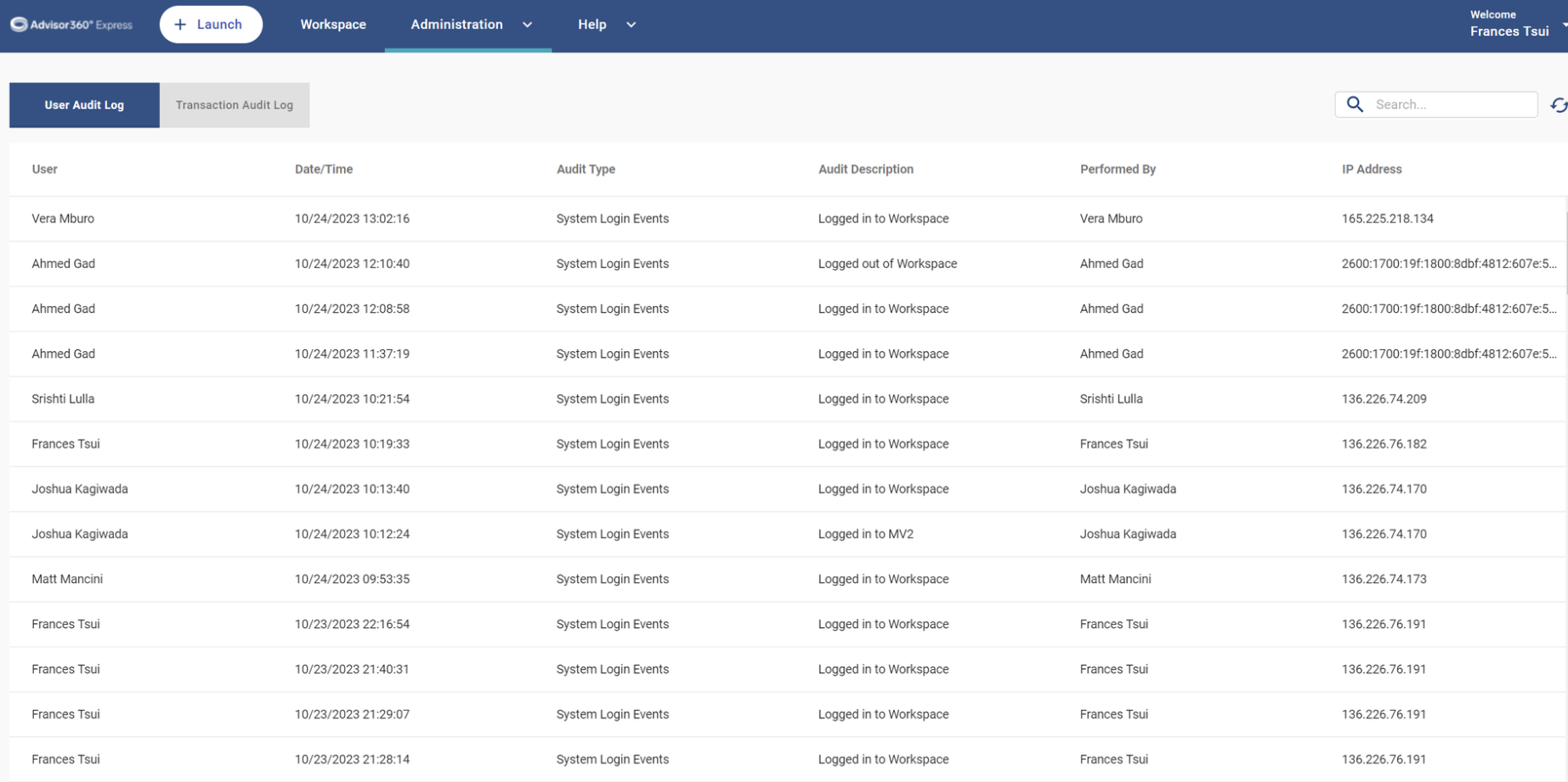
|
Audit Type |
Audit Event |
Sample Details |
|
User Administration |
New User Added |
New User Added, Role: Publisher |
|
User Administration |
Removed User |
Removed User: John Smith (aexmytest2@mailinator.com) |
|
User Administration |
Changed User Role |
Changed User Role from Publisher to Company Admin |
|
User Administration |
Changed User Security Profile from None to Add Security Profiles |
Changed User Security Profile from None to Add Security Profiles |
|
User Administration |
Changed User Phone Number |
Changed User Phone Number from 1 9402455922 to 1 9402455922 |
|
User Administration |
Changed User Language |
Changed User Language from en_US to vi_VN |
|
User Administration |
Changed User Secure Field Visibility |
Changed User Secure Field Visibility from Off to On |
|
Password Change |
Password Reset Email Sent |
Password Reset Email Sent |
|
Password Change |
Password Change |
Password Change |
|
Team Changes |
Added Team: test2 |
Added Team: test2 |
|
Team Changes |
Added User |
Added User: John Smith(jsmith@mailinator.com) to Team: TestTeam |
|
Team Changes |
Removed User |
Removed User: John Smith (jsmith@mailinator.com) from Team: test2 |
|
Team Changes |
Deleted Team: test2 |
Deleted Team: test2 |
|
Team Changes |
Changed Team: <TeamName> Notification Setting |
Changed Team: <TeamName> Notification Setting from Off to On |
|
Access Control Group |
Added Access Control Group |
Added Access Control Group: <GroupName> |
|
Access Control Group |
Added User |
Added User: John Smith(jsmith@mailinator.com) to Access Control Group: Test PWT Group |
|
Access Control Group |
Removed User: |
Removed User: John Smith(jsmith@mailinator.com) from Access Control Group: Sponsor Bank 3 |
|
System Login Events |
Logged in to Workspace |
Logged in to Workspace |
|
System Login Events |
Logged out of Workspace |
Logged out of Workspace |
Transaction Audit Logs
The following Audit Events are captured for transaction related activities.
Case ID, Transaction ID, Date, and Performed By are captured in separate columns for each of the events listed below.
|
Audit Event |
Sample Details |
|
Transaction Creation |
|
|
Document Save |
Document saved by John Smith |
|
Integration API Call: <Name> |
Integration API call :SchwabServiceRequestTask - Error executing job |
|
Signing Document Creation |
Reason: Incorrect Data. |
|
Document Viewed |
Agreement viewed by John Smith |
|
Publishing |
Document published by jsmith@mailinator.com |
|
Document Signed |
jsmith@mailinator.com signed document |
|
Transaction Rewind |
|
|
Transaction Completed |
All documents are signed |
|
Download (Coming Soon - 23.16) |
|
|
Change Signer (Coming Soon - 23.16) |
Signer jsmith@mailinator.com updated to johnsmith@mailinator.com. |
Setup
Contact Support to enable Audit Logs for your Company Admins.
Comments
0 comments
Please sign in to leave a comment.